TD-markitdown Development: Automating Document to Markdown Conversion
The Operational Challenge and Project Context
In modern Artificial Intelligence workflows (such as Retrieval-Augmented Generation or RAG), technical documentation, and software engineering, converting legacy or proprietary document formats (PDF, Word, Excel, PowerPoint) into clean, structured Markdown (.md) has become a critical requirement.
Although Microsoft released markitdown as an open-source command-line tool, substantial usability barriers existed for non-technical users and developers looking for speed:
- CLI Friction: Forcing users to install Python, configure virtual environments, and construct long, error-prone command-line arguments.
- Local Document Privacy: Uploading proprietary data to online third-party conversion sites compromises security and confidentiality.
- Lack of a Visual LLM Configuration: Setting up API keys and parameters to transcribe audio or perform OCR on images using Vision models required modifying Python code directly.
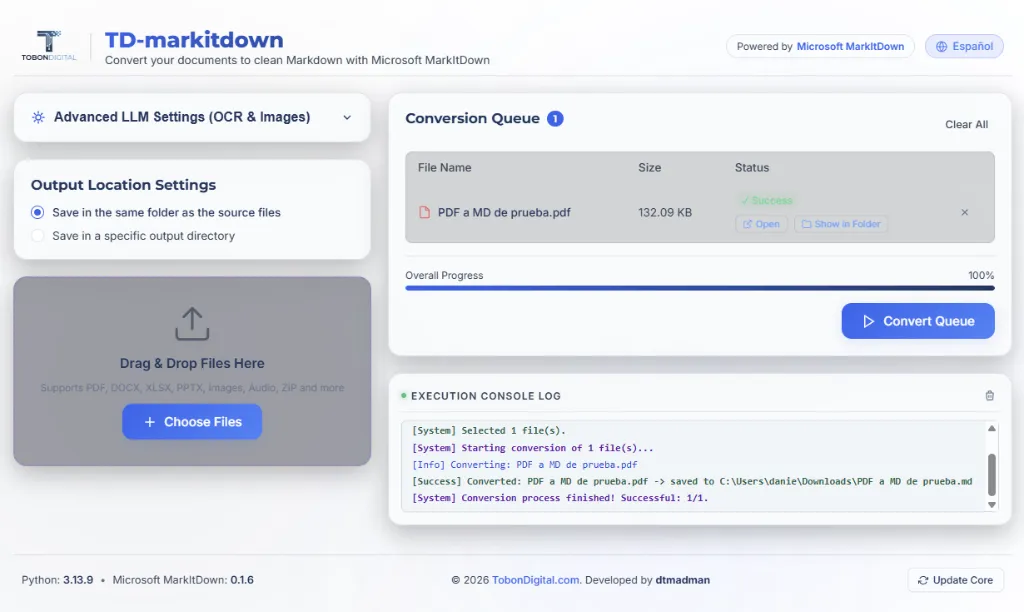
To resolve these operational bottlenecks, we developed TD-markitdown (a product of TobonDigital.com) — a premium, visual, 100% local desktop-web application that automates this workflow with a seamless user experience.
System Architecture and Specifications
The solution was structured as a decoupled, robust, and transparent local system, combining an asynchronous local server with a premium single-page web interface.
graph TD
    A[run.bat Launcher] -->|Bootstraps .venv & Pip| B[FastAPI Local Server]
    B -->|Automatic Launch| C[Default Web Browser]
    C -->|Upload / Drag & Drop| D[FastAPI endpoints]
    D -->|Executes powershell script| E[Native Windows Dialogs]
    D -->|Calls markitdown / optional LLM| F[Markdown Output]
1. Premium Visual User Interface
We designed a responsive Single Page Application (SPA) aligned with TobonDigital’s design guidelines:
- Glassmorphism Aesthetic: Blurs, dynamic gradients (violet and cyan), subtle glow elements, and card shadows.
- Fluid User Experience: Seamless page loaders, smooth fade-out transitions, and full bilingual support (English/Spanish) toggled instantly and persisted via
localStorage. - Interactive Queue: Live monitoring of conversion states (Pending, Converting, Success, Error), global progress percentage tracking, and action buttons to instantly open the output file or reveal its folder on the host computer.
2. Native OS Dialog Bridge via PowerShell
One of the largest hurdles when building local web applications is interacting with the user’s filesystem without violating browser security boundaries.
Instead of relying on heavy browser wrappers or blocking UI libraries (like Tkinter or pywebview, which caused COM/STA threading locks on Windows), we implemented an elegant bypass: the backend API spawns background PowerShell scripts to invoke native Windows file and directory selectors (System.Windows.Forms.OpenFileDialog and FolderBrowserDialog). This enables non-blocking, native file selection dialogs from any standard web browser.
3. Modular LLM Processing Pipeline
We implemented a modular pipeline that allows users to leverage AI models for complex files (transcribing .mp3/.wav recordings, running OCR on layouts, or describing .png/.jpg images using Vision LLMs).
- Supported Providers: Nvidia NIM (featuring free trial models like
llama-3.2-11b-vision-instruct), OpenAI (gpt-4o), OpenRouter (gemini-2.5-flash), and Local compatible endpoints (such as Ollama). - Secure Local Config: API keys and settings are stored locally on the user’s machine (
backend/config.json) and are excluded from Git to prevent accidental token exposure.
Technical Evolution & Refinement
The development cycle evolved through critical lessons regarding local application distribution:
- The Silent Wrapper Obstacle: We initially attempted to bundle the application as a silent background utility (
--noconsolein PyInstaller). This ran into operating system thread-deadlocks (between Python’s GIL and Windows’ UI loops) and false positives from antivirus software. - Uvicorn Daemon Constraints: A windowless build lacked standard output streams (
stdout/stderr), causing defaultuvicornformatters to crash during startup. - Final Design Decision: We reverted to a transparent, console-based server combined with a default browser launcher. We created a bootstrapping script (
run.bat) that automatically handles virtual environment creation, updates dependencies, and starts the FastAPI server. This provides users with a visible log stream and a simple termination process (Ctrl+C).
Project Outcomes & Conclusions
TD-markitdown effectively transformed a command-line utility into a high-end desktop productivity tool. Thanks to its modular design, it features an automatic core upgrade mechanism: the application runs pip updates in a background thread and dynamically injects the local virtual environment’s site-packages at startup, ensuring users always run Microsoft’s latest conversion engine without needing software re-installations.