Building Catalyst Kiosk: Process Automation and Live UX Validation at APA 2026
The Operational & Strategic Challenge
In the industrial UV printing sector, hardware and the final printed object often steal the spotlight. However, from a management and operational efficiency standpoint, the true bottleneck lies in the technical friction between a customer’s custom design and prepress execution. This project was not born to simply manufacture a specific item, but to validate three critical operational hypotheses:
- Total Workflow Automation: Completely eliminate manual file manipulation, scaling, and the nesting of print grids by human operators.
- Operational Decoupling: Provide users with absolute creative freedom through an intuitive interface, entirely freeing them from the technical burden of prepress and print software management.
- User Experience Under High Stress: Engineer a frictionless, interactive flow tailored for massive, fast-paced corporate environments.
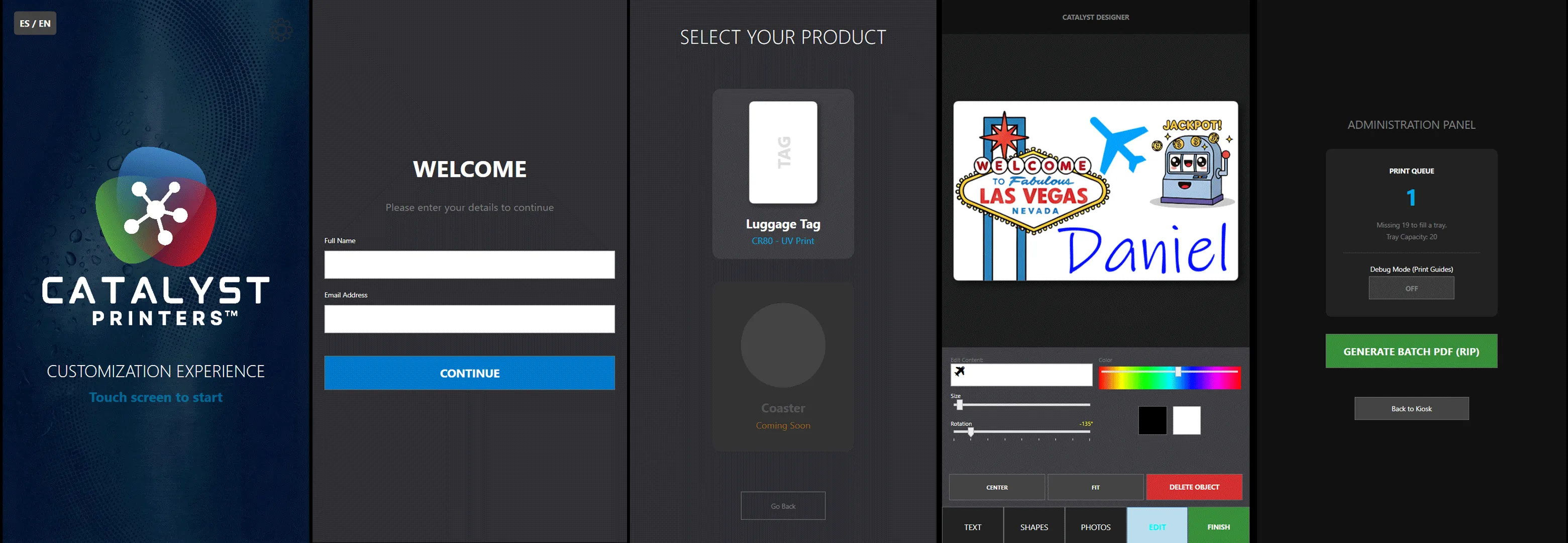
To validate these hypotheses under real-world, high-demand conditions, we deployed the system live during the recent APA 2026 Expo in Las Vegas. In this setting, the chosen product—a Luggage Tag based on standard perforated CR80 plastic cards—was not the protagonist, but a functional, utilitarian vehicle suited for the event environment. Here, the true protagonist is the process.
Technical Architecture & Deployment Specs
The system ran as a native, offline-first application built on WPF and .NET 8, engineered to operate continuously without cloud dependencies on the showroom floor.
WPF Touch UI
User Creative FreedomJSON Queue
C:\Catalyst_ColaGeneradorBatch.cs
PDFSharp ImpositionCatalyst Nanos Bed
Automated RIP IntakeWPF Touch UI
User Creative FreedomJSON Queue
C:\Catalyst_ColaGeneradorBatch.cs
PDFSharp ImpositionCatalyst Nanos Bed
Automated RIP Intake1. Seamless UI and Layout Scaling
To maximize layout stability across diverse kiosk hardware, the front-end architecture uses a unified WPF Viewbox. For the APA 2026 show, this allowed smooth vector mapping onto 1080x1920 portrait touchscreens. The system completely encapsulates native Windows input behaviors, forcing TabTip.exe execution upon text-field focus to keep user data entry fully digital and keyboard-less.
2. Agnostic Data Extraction & FIFO Queue
Upon user completion, the canvas engine translates vector transformations, fonts, and rasterized assets into a flat JSON payload stored in C:\Catalyst_Cola. By processing raw coordinate data instead of pre-rendered graphics, the core processing engine remains entirely product-agnostic. The administrative backend consumes this queue via strict FIFO (First In, First Out) logic.
3. Micro-Precision Imposition via PDFSharp
The heart of the automation lies in GeneradorBatch.cs, which parses the JSON payloads and perfectly nests them onto an A3 (420mm wide) production sheet.
- Millimetric Positioning: Coordinates were calibrated to the micron level to perfectly align with the physical slots of the CR80 hardware tray used at the APA expo.
- Bleed Control: Through precision clipping matrices using
XGraphics.IntersectClip, the software suppresses overflows or white borders resulting from user design inconsistencies. - Direct RIP Routing: The final PDF, containing native vectors and 300+ DPI images, is dropped directly into a hot folder (
C:\DPI LAB\Apps\CatalystKiosk\Hotfolder), triggering the RIP software to process and print it on the Catalyst Nanos immediately.
Live Performance Analysis: APA Expo 2026
The operational feedback during the expo demonstrated that the process is the platform. While this particular demonstration leveraged CR80 cards and the compact Catalyst Nanos printer, the software architecture is inherently chameleon-like: the data-to-production-PDF pipeline can be adapted to any UV print bed or object format.
Current Optimizations & Refinements
Based on telemetry and physical QA gathered in Las Vegas, we are actively refining the following control points:
- Aspect Ratio Locking: Hardening the state extractor to ensure custom user uploads strictly maintain their original aspect ratios within the JSON, preventing rectangular distortion.
- Diagnostic X-Ray Mode: Injecting 0.1pt guide lines (red) and center axes (blue) into test PDFs to visually contrast the software’s logical coordinates against the mechanical position of the hardware.
- Matrix Adjustments via JSON: Exposing gap variables and the master scale factor (
FACTOR_ESCALA) directly into the externalConfiguracion.json. This allows for on-site calibration tuning without the need to modify or recompile the C# executable.
Key Strategic Takeaways
- Zero-Cost Prepress: Radically reduced the technical file prep time from minutes of designer intervention to exactly zero seconds of human interaction.
- Hardware Agility: Decoupling the print template into an external configuration file allows the entire system to be migrated from the A3 format of the Nanos to large-format 90x60cm beds (like the Catalyst Aventra) simply by altering the hot folder routing.
- Process Marketing: The true value of the live demonstration was not the final physical tag given to the attendee, but showcasing a fluid, transparent software infrastructure capable of resolving industrial complexity in real time.